
Digital media is thriving and quite honestly one of the most influential ways people give and receive information in the 21st century. In the past the education system has attempted to limit the use of digital media in the classroom, especially in terms of social media, as it has been seen as a distraction. Digital media has evolved to be a part of almost every person’s daily life, it is at this point that the education system must now harness these resources and educate students on how to use and create these platforms.
I'm sure you have heard the saying, 'a picture is worth a thousand words', and that is exactly why images are one of the simplest yet effective forms of digital media. Each image presents a mass of information that enables students to interconnect with each other and inform others of their findings, collaborative learning has benefits such as retention, increased self-esteem and oral communication skills (Cornell University, 2022). Teachers can use images to engage students thinking, influence their feelings towards a particular story or event, and develop evaluation skills.
Images present story telling opportunities for teachers and students; students who struggle with reading and writing are better able to immerse themselves in this type of educational content. Students require stimulants to keep their mind engaged, studies have shown that auditory learning alone is not as effective as visual and kinaesthetic learning (Cole, D. 2014).
An effective use of visual data is concept mind mapping, this gives students a way to visually represent their knowledge. Mind maps are editable which allow students to revaluate their ideas as they continue their learning journey while also allowing creators to combine elements such as images, text, files, geographic locations, calendar events and more.
Below you can see the different way mind maps can be used:
 Retrieved from: https://venngage.com/blog/mind-map-examples/
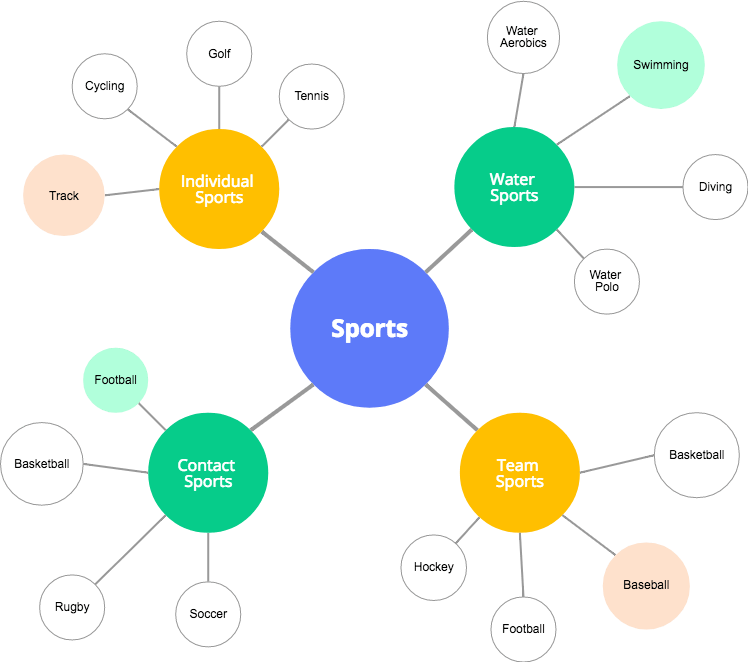
Mind mapping can help people learn new concepts, according to research, mind mapping allows you to make connection between knew knowledge and existing knowledge, this is known as 'Meaningful Knowledge' and leads to excellent retention (Guthrie, 2020).
There are several sources available on the internet for students to create these mind maps, fortunately most are easy to use and require no experience. These include Wise mapping, Coggle and Popplet, just to name a few.For those of you who have read my previous blogs I am sure you are quite aware that my initial reaction to this unit, if not, I will remind you, I was FREAKING OUT! Well once again I am sharing with you another moment when I had a minor breakdown and this was when I opened the introduction tab on Moodle and saw the 'Unit Overview Mind Map' by Glenda Hobdell. I immediately felt overwhelmed and thought, who could possibly look at this and think it made things EASIER? Well, isn't it ironic? Since than I have become more open to the ideas of Digital Pedagogies and have begun looking at this mind map on a regular basis as it breaks down the course in a way that I find a lot easier to comprehend. If you haven't looked at this overview yet, I highly suggest you do.
It is vital students are educated on the laws of image copyright to avoid repercussions when using and sharing images. Under Australian law there is no registration system for copyright, forms of expression such as text, images and music are automatically covered under the Copyright when they are published (Copyright agency, 2022). There are hundreds of myths surrounding what is and isn't considered copyright and this leads people like myself to be confused and uneducated on the matter. A useful site I have found this week that provides guidance simplifies the copyright laws of Australia is the Copyright Agency. Another document that teachers and secondary students to become familiar with is the Copyright Act.
A great way to incorporate images into the classroom is by providing a camera (or allowing mobile devices in some circumstances) for students or teacher to take photo relating to the topics being taught. One example could be students taking step by step photos when conducting a science experiment such as dissecting a toad. A 2017 study has shown not only that taking looking back on pictures can help recall one’s memory but the process of taking photos, adjusting the focus and looking at the finer detail you are wanting to remember can deeply embed memories into the subconscious (Austin, D. 2021).
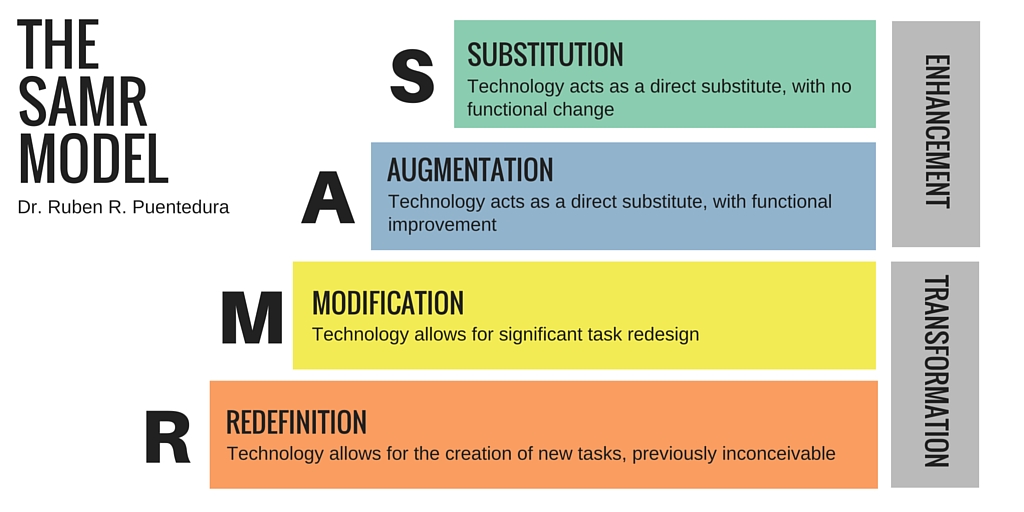
When reflecting back on the SAMR model spoken about in my previous blogs, it is evident that images can be incorporated into the classroom in ways that suit both higher order thinking and lower order thinking.
See below for my examples at each level:
 |
| Retrieved from: https://en.wikiversity.org/wiki/Instructional_design/SAMR_Model/What_is_the_SAMR_Model%3F |
Comments
Post a Comment